

Poster Discussion Guideline
Important Notes
- All participants who are allotted to Poster Discussion should prepare their presentation materials and participate in the session on-site.
- Location: Grand Hall Lobby
- Presentation Schedule: Please check your session information on [My Page] on the GBCC Website.
- Presentation Time (for on-site presentation): 7 minutes (5m. Presentation + 2m. Q&A)
- PPT File & ePoster Submission Deadline:
April 5 (Sun), 2026April 9 (Thu.), 2026
How to Prepare Your Presentation and ePoster
STEP 1
Make Your Presentation Materials
Please use the GBCC 2026 PPT Template to provide a consistent look.
Follow the instructions of the presentation below:
- Format: Microsoft Office PowerPoint (.ppt), (.pptx)
- Language: English
- Screen Ratio: 16:9
- Font: Please use default font provided by MS Office such as Arial, Calibri, etc. in order to avoid any potential problems.
- Video & Audio Files: If you have videos or audio files in the presentation, please embed them and also bring files on USB memory stick or send it to your email as a backup copy.
- All Poster Discussion Presenters must submit presentation slides (PPT) & ePoster.
- Please refer to the Poster Discussion Guideline for details regarding presentation slides (PPT) & ePoster.
STEP 2
Submit Your PPT by April 5 (Sun.), 2026 April 9 (Thu.), 2026
- Please submit your PPT slides via GBCC Abstract email. ([email protected])
• Please use the GBCC 2026 PPT Template to provide a consistent look.
• Follow the instructions of the presentation below:
- Format: Microsoft Office PowerPoint (.ppt), (.pptx)
- Language: English
- Screen Ratio: 16:9
- Font: Please use default font provided by MS Office such as Arial, Calibri, etc. in order to avoid any potential problems.
- Video & Audio Files: If you have videos or audio files in the presentation, please embed them and also bring files on USB memory stick or send it to your email as a backup copy.
- Please refer to the Poster Discussion Guideline.
STEP 3
Submit Your ePoster by April 5 (Sun.), 2026 April 9 (Thu.), 2026
- Please log-in to the GBCC Official Website and submit your ePoster.
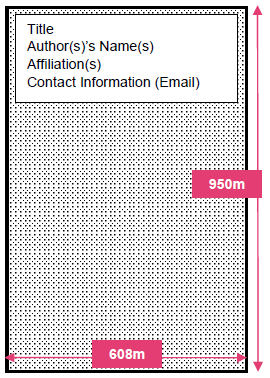
[My Page] – [Abstract] – [Upload PDF ePoster] - Poster Size: 608mm width × 950mm height
- When you are designing your ePoster using PowerPoint(PPT), please make sure all information fits in ONE PAGE only.
- Please refer to the Poster Discussion Guideline.
STEP 4
Check-in at the Preview Room
- Speaker's Lounge & Preview Room: Ida 1 & 2, B1F
- Operating Hours: April 23 (Thu.) 07:00-18:00 / April 24 (Fri.) 07:00-18:00
- Please ensure you visit the Speaker's Lounge at least 30 minutes before your presentation.